
Tech Tip: Qodly Studio Preview: Recurring Sign-In Pop-Up Caused by BASIC Protocol Authentication
PRODUCT: Qodly Studio | VERSION: 20 R | PLATFORM: Mac & Win
Published On: August 18, 2025
When previewing an application in Qodly Studio, a recurring “Sign in” pop-up may appear.
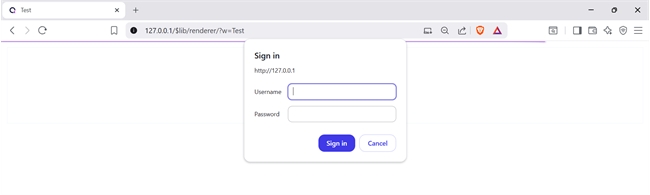
This behavior can occur when the Web Passwords type in the project configuration is set to “Passwords with BASIC protocol”.
Changing the Web Passwords type to “Custom authentication” resolves the issue.
In the project settings, locate the Web Passwords configuration on Web Tab -> Options (I), change the type to “Custom authentication,” then save and restart the project.
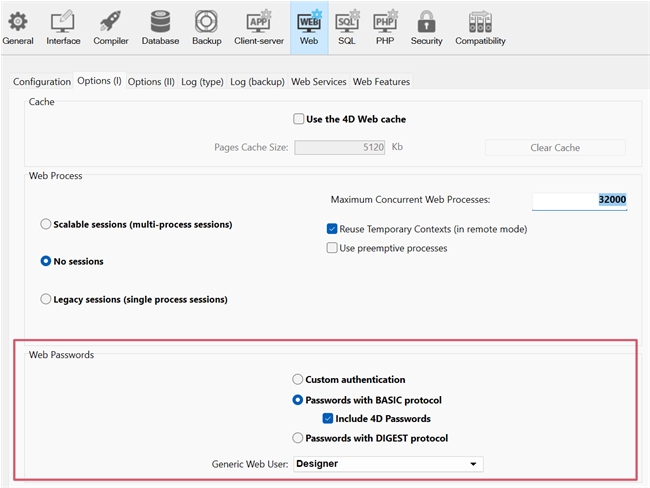
After applying this change, the sign-in pop-up will no longer appear, ensuring a smoother preview experience in Qodly Studio.
This behavior can occur when the Web Passwords type in the project configuration is set to “Passwords with BASIC protocol”.
Changing the Web Passwords type to “Custom authentication” resolves the issue.
In the project settings, locate the Web Passwords configuration on Web Tab -> Options (I), change the type to “Custom authentication,” then save and restart the project.
After applying this change, the sign-in pop-up will no longer appear, ensuring a smoother preview experience in Qodly Studio.