
Tech Tip: Circular Link Propagation Issue
PRODUCT: 4D | VERSION: 20 R | PLATFORM: Mac & Win
Published On: October 27, 2025
A circular propagation can occur when links between tables are both set to Automatic. 4D does not support circular relationships when all participating links forward are defined as Automatic.
Commands like RELATE ONE SELECTION may not work properly in this case.
For example, this is the structure of the database:
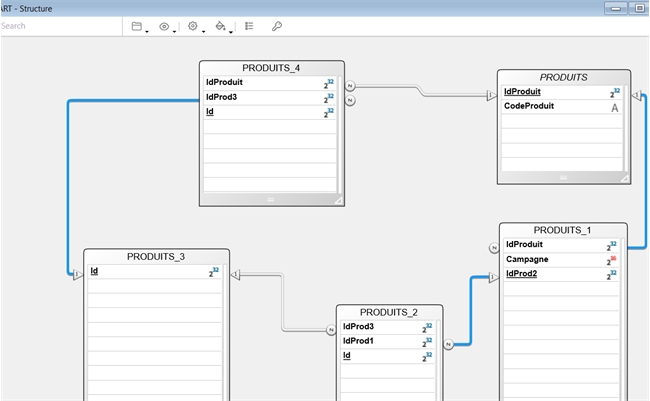
the links between table is set to automatic , when executing:
This is the result when all links in the same direction are set to Automatic.
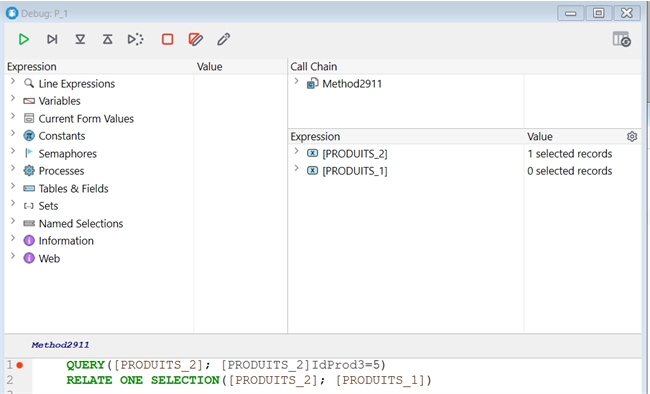
The command RELATE ONE SELECTION([PRODUITS_2]; [PRODUITS_1]) does not return the expected value from [PRODUITS_1]. As shown in the debugger, [PRODUITS_1] has 0 selected records, while [PRODUITS_2] has 1 selected record, which includes a valid value in the produit_1 field.
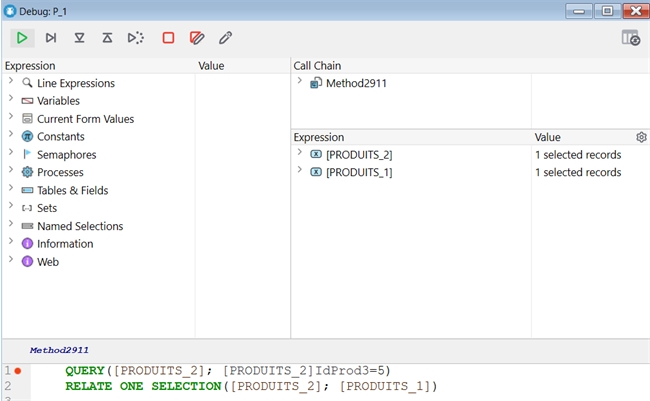
To solve the problem, choose a link in the same direction.(for instance, the 1→N link from [PRODUITS].IdProduit to [PRODUITS_4].IdProduit) and change its propagation mode from Automatic to Manual, then restart the database.
Here's the result:
Commands like RELATE ONE SELECTION may not work properly in this case.
For example, this is the structure of the database:
the links between table is set to automatic , when executing:
| QUERY([PRODUITS_2]; [PRODUITS_2]IdProd3 = 5) RELATE ONE SELECTION([PRODUITS_2]; [PRODUITS_1]) |
This is the result when all links in the same direction are set to Automatic.
The command RELATE ONE SELECTION([PRODUITS_2]; [PRODUITS_1]) does not return the expected value from [PRODUITS_1]. As shown in the debugger, [PRODUITS_1] has 0 selected records, while [PRODUITS_2] has 1 selected record, which includes a valid value in the produit_1 field.
To solve the problem, choose a link in the same direction.(for instance, the 1→N link from [PRODUITS].IdProduit to [PRODUITS_4].IdProduit) and change its propagation mode from Automatic to Manual, then restart the database.
Here's the result: