
Tech Tip: How to Display Custom Error Messages to Users
PRODUCT: Qodly Studio | VERSION: 20 | PLATFORM: Mac & Win
Published On: October 27, 2025
Displaying an error message is important to notify users why something failed for them. For instance, during the authentication process, if the user enters their username or password incorrectly, an error message should be displayed to let them know. Use the “throw” command in the authentify function to send a custom error message. For example:
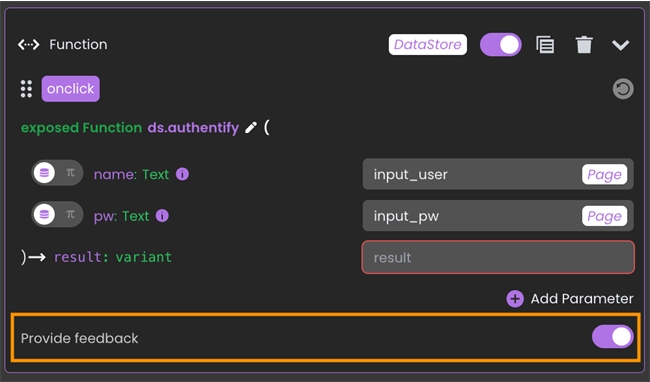
Then, in Qodly Studio, within the action panel that binds the authentify function, enable the “Provide feedback” setting:
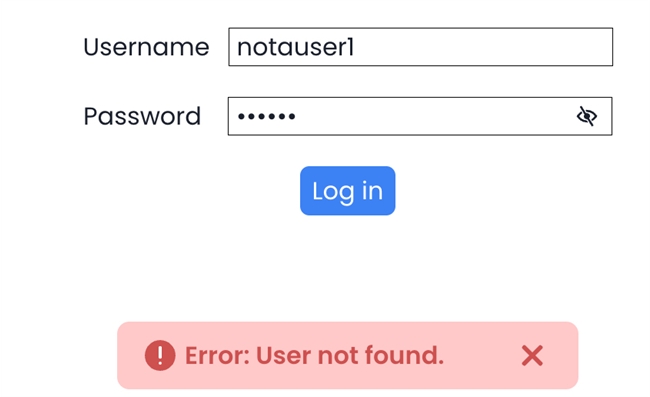
This way, when a user triggers the error, the custom message passed in “throw” will be automatically displayed to them.
| exposed Function authentify($name : Text; $pw : Text) $users:=ds.Users.query("name = :1"; $name) $user:=$users.first() If ($user#Null) If (Verify password hash($pw; $user.pw)) Session.setPrivileges("client") Else throw(401; "Credentials do not match.") End if Else throw(401; "User not found.") End if |
Then, in Qodly Studio, within the action panel that binds the authentify function, enable the “Provide feedback” setting:
This way, when a user triggers the error, the custom message passed in “throw” will be automatically displayed to them.