
Tech Tip: Retrieving Record Creation Date in 4d
PRODUCT: 4D | VERSION: 20 R | PLATFORM: Mac & Win
Published On: November 6, 2025
In 4D, there are two ways to access the creation date of a record:
The _TIMESTAMP attribute represents the last modification date of the entity.
- Using the Activity Analysis (MSC): The Activity Analysis page in the Maintenance and Security Center (MSC) provides details similar to those stored in the 4D journal log, including record creation and modification events.
- Using a REST Request: If the table is exposed as a REST resource (Structure Settings > Web Features > Expose as REST server), you can send an HTTP GET request through a REST client (browser, Postman, etc.) to retrieve the record metadata.
Example: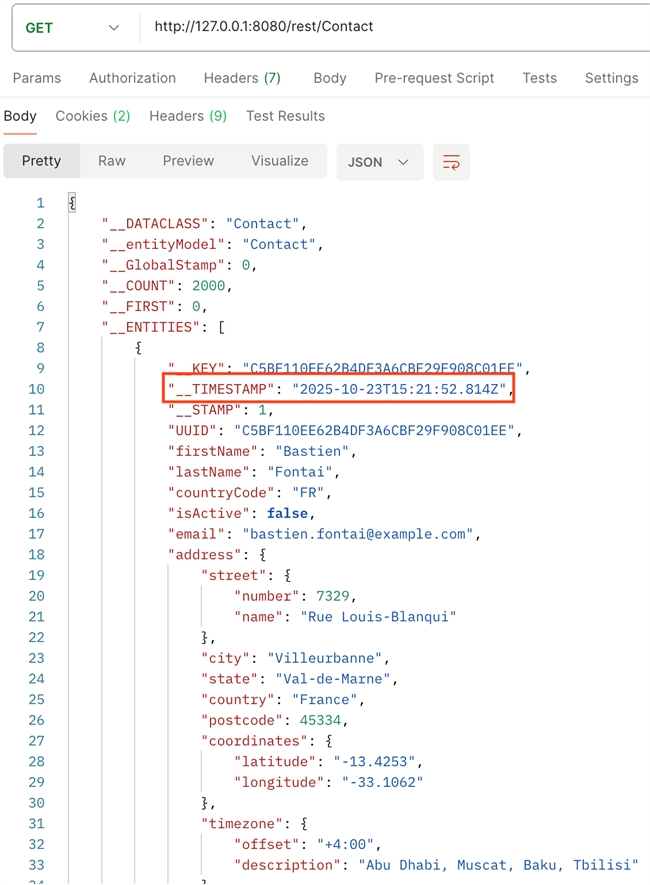
This method returns structured metadata, including timestamps.
The _TIMESTAMP attribute represents the last modification date of the entity.
- If no modification has occurred, _TIMESTAMP corresponds to the creation date.
- If the record was modified, the original creation date can be found in the 4D journal file, which logs all entity operations.