
Tech Tip: Two Ways to Create Data Model Class
PRODUCT: Qodly Studio | VERSION: 20 R | PLATFORM: Mac & Win
Published On: November 12, 2025
Data model classes allow developers to write functions that interface with dataclass, entity, and entity selection class objects. The traditional way to create a data model class is to create a new class in 4D and name it [DataClassName] (for DataClass class), and append “Entity” (for Entity class) or “Selection” (for EntitySelection class). For example, to create an EntitySelection class for a “Hosts” dataclass, name a new class “HostsSelection”.
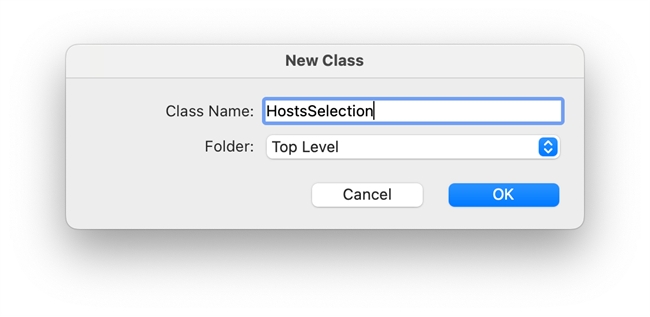
4D will automatically recognize the dataclass and keyword in the name and create an appropriate class that extends the data model.
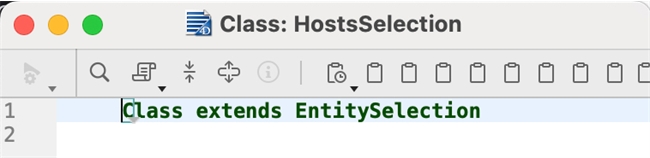
When working with Qodly Studio, there is an alternative way to create a data model class. Expand the “Classes” directory in the Explorer sidebar and look for the DataClass name, then select the desired data model (DataClass, Entity, or Selection) under the dataclass.
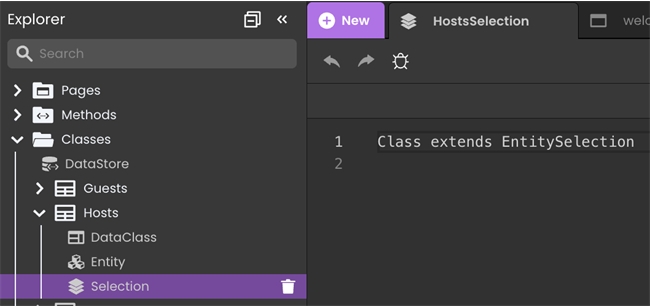
This is a quick way to create a data model class without needing to remember the exact spelling of the dataclass and/or appending keywords.
4D will automatically recognize the dataclass and keyword in the name and create an appropriate class that extends the data model.
When working with Qodly Studio, there is an alternative way to create a data model class. Expand the “Classes” directory in the Explorer sidebar and look for the DataClass name, then select the desired data model (DataClass, Entity, or Selection) under the dataclass.
This is a quick way to create a data model class without needing to remember the exact spelling of the dataclass and/or appending keywords.