
Tech Tip: Controlling Image Style with DALL-E 3 in 4D AIKit
PRODUCT: 4D | VERSION: 20 R | PLATFORM: Mac & Win
Published On: November 19, 2025
Control the visual mood of AI-generated images by choosing between DALL-E 3's two style options: vivid creates eye-catching, vibrant images while natural produces realistic, professional results.
Understanding the style parameter helps generate images that match specific use cases, whether for eye-catching marketing visuals or realistic product photography.
Vivid style : Hyper-real, dramatic images with vibrant colors
The model generates more artistic, bold, and attention-grabbing visuals. Colors are enhanced and lighting is more dramatic.
Natural style : More realistic and subdued appearance
The model produces authentic-looking images with true-to-life colors and lighting. Better for professional or documentary-style visuals.
The choice between vivid and natural depends on the use case: vivid for marketing and social media, natural for product catalogs and professional content.
To understand the difference more precisely, here are two results of the same prompt with different style values :
Example 1 : Vivid style
Result :
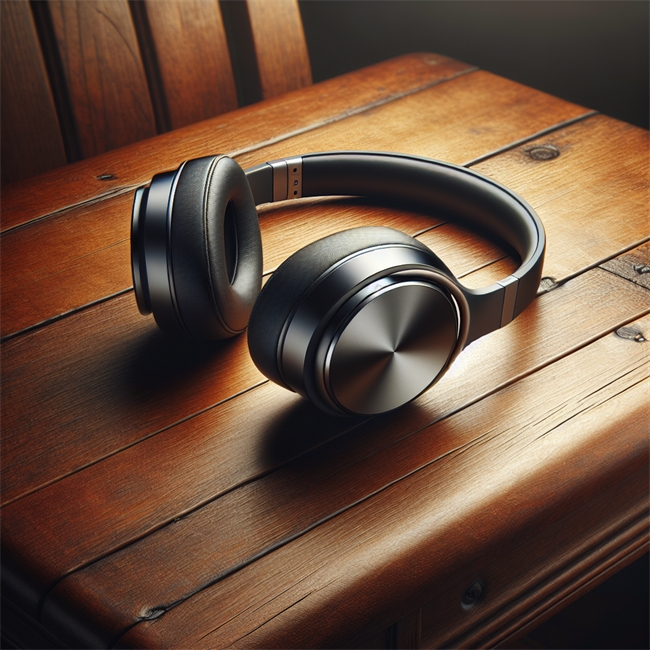
Example 2 : Natural style
Change only the style value in $options as follow :
Result :

As noticed, the same prompt has result different results based on the choosed style.
Note : The style parameter affects the overall mood and realism of the image. However, visual style can also be controlled through detailed prompts (e.g., "minimalist", "vintage aesthetic", "cinematic lighting"). The style parameter works alongside the prompt description.
Understanding the style parameter helps generate images that match specific use cases, whether for eye-catching marketing visuals or realistic product photography.
Vivid style : Hyper-real, dramatic images with vibrant colors
The model generates more artistic, bold, and attention-grabbing visuals. Colors are enhanced and lighting is more dramatic.
Natural style : More realistic and subdued appearance
The model produces authentic-looking images with true-to-life colors and lighting. Better for professional or documentary-style visuals.
The choice between vivid and natural depends on the use case: vivid for marketing and social media, natural for product catalogs and professional content.
To understand the difference more precisely, here are two results of the same prompt with different style values :
Example 1 : Vivid style
var $client var $prompt : Text var $options : Object var $result : Object $client:=cs.AIKit.OpenAI.new("API Key") $prompt:="Wireless headphones on wooden desk, product photography" $options:={\ model: "dall-e-3"; \ style: "vivid"; \ size: "1024x1024"} $result:=$client.images.generate($prompt; $options) If ($result.success) $image:=$result.image If ($image#Null) $image.saveToDisk(Folder(fk desktop folder).file("headphoneVivid.png")) End if End if |
Result :
Example 2 : Natural style
Change only the style value in $options as follow :
| $options:={\ model: "dall-e-3"; \ style: "natural"; \ size: "1024x1024"} |
Result :
As noticed, the same prompt has result different results based on the choosed style.
Note : The style parameter affects the overall mood and realism of the image. However, visual style can also be controlled through detailed prompts (e.g., "minimalist", "vintage aesthetic", "cinematic lighting"). The style parameter works alongside the prompt description.