
Tech Tip: How to Rename Text Component Linked to Qodly Source
PRODUCT: Qodly Studio | VERSION: 20 R | PLATFORM: Mac & Win
Published On: December 19, 2025
When adding dynamic text component to a page from a Qodly source (such as from a Dataclass) the text will usually appear in the editor as something like “$This.myAttribute” by default.
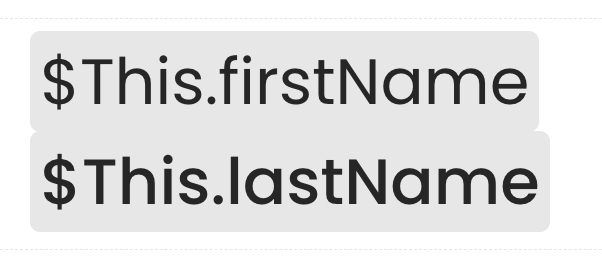
To rename the text but keep the functionality of the data source, double-click on the text component and select “Toggle Qodly Source”.
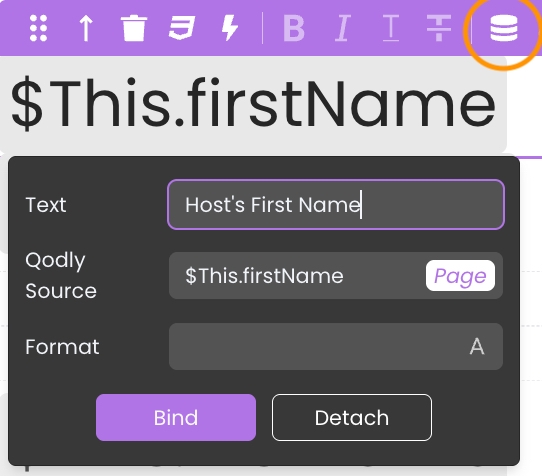
Then, update the “Text” field to the desired title and select Bind (not changing the Qodly Source field).
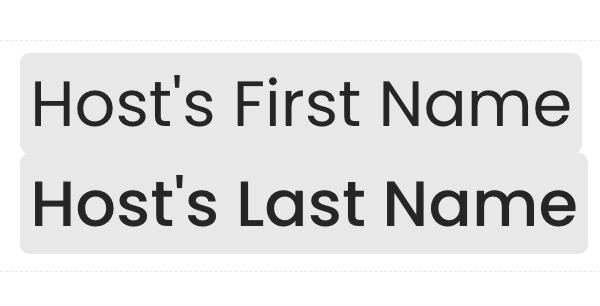
This allows for more appropriate titles to Qodly source-linked text components. Especially on a page filled with many different kinds, it is easier to track and maintain various Qodly sources.
To rename the text but keep the functionality of the data source, double-click on the text component and select “Toggle Qodly Source”.
Then, update the “Text” field to the desired title and select Bind (not changing the Qodly Source field).
This allows for more appropriate titles to Qodly source-linked text components. Especially on a page filled with many different kinds, it is easier to track and maintain various Qodly sources.