
Tech Tip: Fix Error #1000: “Unable to Attach Debugger”
PRODUCT: Qodly Studio | VERSION: 21 | PLATFORM: Mac & Win
Published On: January 13, 2026
When working in Qodly Studio and attempting to activate the debugger, an error may be encountered that states the following:
Error #1000
Unable to attach debugger.
Debugger is already attached to the server.
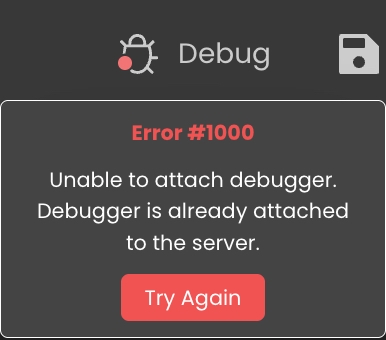
This error may occur when Qodly Studio is launched from 4D Server, and the debugger has been attached to 4D Server (usually at startup by default). Since no more than one debugger can be run at the same time, Qodly Studio cannot use debugger if it is already attached to 4D Server. To resolve this issue, go to the Edit menu in 4D Server and select “Detach Debugger” before trying to use Debug in Qodly studio again.
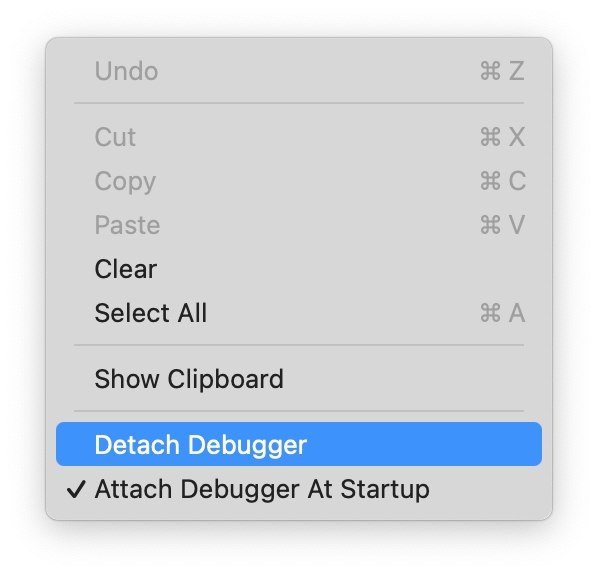
If this becomes a recurring issue, consider toggling off the "Attach Debugger At Startup" setting on 4D Server.
Error #1000
Unable to attach debugger.
Debugger is already attached to the server.
This error may occur when Qodly Studio is launched from 4D Server, and the debugger has been attached to 4D Server (usually at startup by default). Since no more than one debugger can be run at the same time, Qodly Studio cannot use debugger if it is already attached to 4D Server. To resolve this issue, go to the Edit menu in 4D Server and select “Detach Debugger” before trying to use Debug in Qodly studio again.
If this becomes a recurring issue, consider toggling off the "Attach Debugger At Startup" setting on 4D Server.