
Tech Tip: Using PDF Files with 4D AIKit (Purpose="assistants")
PRODUCT: 4D | VERSION: 21 | PLATFORM: Mac & Win
Published On: January 20, 2026
Starting with 4D 21 R2, 4D AIKit introduces native support for uploading and using files directly in AI conversations. This enhancement allows AI models to work with original documents without requiring any preprocessing or format conversion.
Before 4D 21 R2, PDF documents could not be used directly with AIKit. The common workaround was to convert PDF pages into images using the pdfium plugin, then send those images to AIKit through vision-based APIs. While effective, this approach added extra steps. Please check : https://kb.4d.com/assetid=79874
When uploading files for AI conversations, it is important to specify the correct purpose. For document analysis and conversational usage, the file must be uploaded with the "assistants" purpose.
Using another purpose may result in errors.
Example:
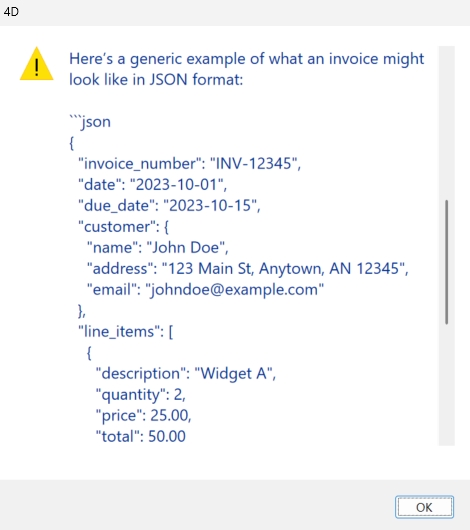
Result :
Before 4D 21 R2, PDF documents could not be used directly with AIKit. The common workaround was to convert PDF pages into images using the pdfium plugin, then send those images to AIKit through vision-based APIs. While effective, this approach added extra steps. Please check : https://kb.4d.com/assetid=79874
When uploading files for AI conversations, it is important to specify the correct purpose. For document analysis and conversational usage, the file must be uploaded with the "assistants" purpose.
Using another purpose may result in errors.
Example:
var $client : cs.AIKit.OpenAI var $file : Object var $messages : Collection var $result : Object $client:=cs.AIKit.OpenAI.new("sk-proj-xxx") // Upload PDF with assistants purpose var $preFile:=File("/Resources/invoice.pdf") $file:=$client.files.create($preFile; "assistants") // Build messages $messages:=New collection $messages.push({\ role: "user";\ content: "Extract invoice data as JSON";\ attachments: [$file.id]}) // Execute request $result:=$client.chat.completions.create($messages) If ($result.success) ALERT($result.choice.message.content) End if |
Result :