
Tech Tip: Querying Data with AI in 4D AIKit
PRODUCT: 4D | VERSION: 21 | PLATFORM: Mac & Win
Published On: January 27, 2026
Large language models typically generate responses based on pretrained data or information available on the internet. In business contexts, the ability to query internal databases or execute defined functions significantly enhances AI utility. Tools allow AI to perform these actions, enabling precise, actionable responses.
Starting with 4D 21, AIKit introduces the OpenAITool class, enabling seamless the integration of project functions into AI workflows. This allows AI to call predefined functions, retrieve data from databases, and produce accurate output responses.
Why is it important to use OpenAITool?
Without function calling:
With function calling:
Example: Fetching customer data by ID using a defined tool:
1. Define the Tool:
Specify the function that AI can call, its parameters, and expected inputs.
Note: The method "getCustomerById" must exist in the 4D Project to be accessible to the AI.
2. Initialize AI Client and Messages
Set up the AI client and create the conversation context for the assistant.
3. Create Parameters and Make First Request
Attach the defined tool to the AI request and initiate the first chat completion.
4. Process Tool Calls
Detect if AI requested a tool call, parse arguments, and execute the function to fetch data.
5. Get Final AI Response
Send the updated conversation to AI again to generate a final response including the fetched data.
Result :
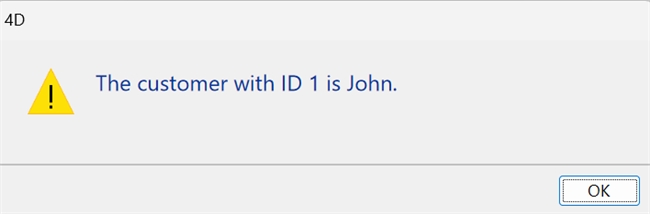
This is the result for an existing customer
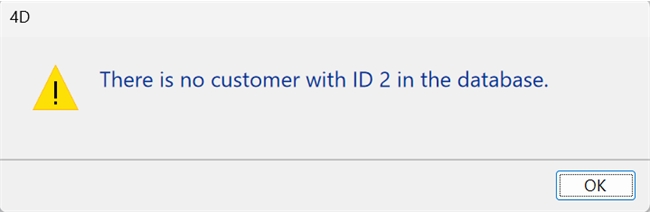
This is the result when the customer does not exist.
Starting with 4D 21, AIKit introduces the OpenAITool class, enabling seamless the integration of project functions into AI workflows. This allows AI to call predefined functions, retrieve data from databases, and produce accurate output responses.
Why is it important to use OpenAITool?
Without function calling:
| User: "What's the status of customer ID 1?" AI: "I don't have access to your database. Please check your records." |
With function calling:
| User: "What's the name of customer ID 1?" AI: [Calls getCustomerById(1)] AI: "The customer with ID 1 is John" |
Example: Fetching customer data by ID using a defined tool:
1. Define the Tool:
Specify the function that AI can call, its parameters, and expected inputs.
| var $tool : cs.AIKit.OpenAITool $tool:=cs.AIKit.OpenAITool.new({\ type: "function"; \ function: {\ name: "getCustomerById"; \ description: "Fetch customer data from the database by customer ID"; \ parameters: {\ type: "object"; \ properties: {\ customerID: {type: "integer"; description: "The customer ID"}\ }; \ required: ["customerID"]\ }}}) |
Note: The method "getCustomerById" must exist in the 4D Project to be accessible to the AI.
| #DECLARE($customerId : Integer)->$eCustomer : cs.CustomerEntity $eCustomer:=ds.Customer.query("ID=:1"; $customerId).first() |
2. Initialize AI Client and Messages
Set up the AI client and create the conversation context for the assistant.
| var $client : cs.AIKit.OpenAI var $messages : Collection $client:=cs.AIKit.OpenAI.new("API Key") $messages:=New collection $messages.push({role: "system"; content: "Assistant always uses available functions to fetch data."}) $messages.push({role: "user"; content: "Get customer with ID 1"}) |
3. Create Parameters and Make First Request
Attach the defined tool to the AI request and initiate the first chat completion.
| var $params : cs.AIKit.OpenAIChatCompletionsParameters var $result : Object $params:=cs.AIKit.OpenAIChatCompletionsParameters.new({model: "gpt-4o-mini"; tools: [$tool]}) $result:=$client.chat.completions.create($messages; $params) |
4. Process Tool Calls
Detect if AI requested a tool call, parse arguments, and execute the function to fetch data.
| If ($result.choices#Null) && ($result.choices.length>0) If ($result.choices[0].message.tool_calls#Null) && ($result.choices[0].message.tool_calls.length>0) $messages.push($result.choices[0].message) Var $toolCall : Object For each ($toolCall; $result.choices[0].message.tool_calls) Var $args : Object $args:=JSON Parse ($toolCall.function.arguments) var $eCustomer : cs.CustomerEntity $eCustomer:=getCustomerById($args.customerID) Var $customerJSON : Text If ($eCustomer#Null) $customerJSON:=JSON Stringify(New object("id"; $eCustomer.ID; "name"; $eCustomer.Name)) Else $customerJSON:=JSON Stringify(New object("error"; "Customer not found")) End if $messages.push({role: "tool"; tool_call_id: $toolCall.id; content: $customerJSON}) End for each End if End if |
5. Get Final AI Response
Send the updated conversation to AI again to generate a final response including the fetched data.
| $params:=cs.AIKit.OpenAIChatCompletionsParameters.new({model: "gpt-4o-mini"}) $result:=$client.chat.completions.create($messages; $params) If ($result.choices#Null) && ($result.choices.length>0) && ($result.choices[0].message.content#Null) var $response : Text $response:=$result.choices[0].message.content ALERT($response) End if |
Result :
This is the result for an existing customer
This is the result when the customer does not exist.