
Tech Tip: Ways to Duplicate Components in Qodly Studio
PRODUCT: Qodly Studio | VERSION: 21 | PLATFORM: Mac & Win
Published On: March 31, 2026
When developing pages in Qodly Studio, there are a couple ways to duplicate a component or group of components for multiple uses, retaining their layout and styling. One way is to select the component or stylebox of components, and then select the Copy option in the More Options dropdown.
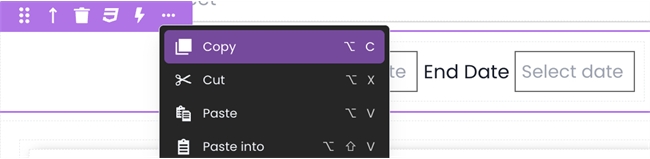
Then, select the Paste or Paste Option onto another area of the page (or even a different page) to create a duplicate. Another way is to save it as a crafted component, so that it can be pulled from the Crafts library later. This is useful for when the component needs to be re-used frequently on many different pages.

Then, select the Paste or Paste Option onto another area of the page (or even a different page) to create a duplicate. Another way is to save it as a crafted component, so that it can be pulled from the Crafts library later. This is useful for when the component needs to be re-used frequently on many different pages.