Tech Tip: Quickly View Value of Expression in Qodly Studio Debugger
PRODUCT: Qodly Studio | VERSION: 21 | PLATFORM: Mac & Win
Published On: April 6, 2026
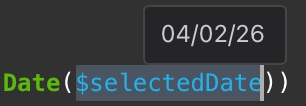
When working in Qodly Studio, the debugger is useful for investigating code issues such as event actions assigned to class functions. While the debugger is active, to view the values of qodlysources passed from the frontend, the variables in the debugger can be added to the expression panel. The values of various variables can also be viewed in the variables panel. To quickly view the value of a particular expression, highlight the entire expression or variable, and then hover the mouse over it. The value will appear over the highlight.